I used to spend a lot of my data life in SQL Server Management Services (SSMS), now it is Fabric Notebooks. I’m not complaining, its now the stack I use. So here are a few tips on how I use some of the features in them, and some workflow items that make life easier. Well at least in terms of your Fabric work life anyway.
Notebook Utils
There are a lot of great features in the NotebookUtils library, but there is one that I use a lot in creating data engineering pipelines and logging. Yes, logging, only second to documentation in ‘ugghh’ do I have to do it.
notebookutils.runtime.context
This returns a lot of information about the current context in a dictionary structure, which can then be used in your logging process.

You get notebook name, current workspace, default lakehouse name, pool name and so on. No need to hardcode some of the items that you may need to add into your logging and error handling process.
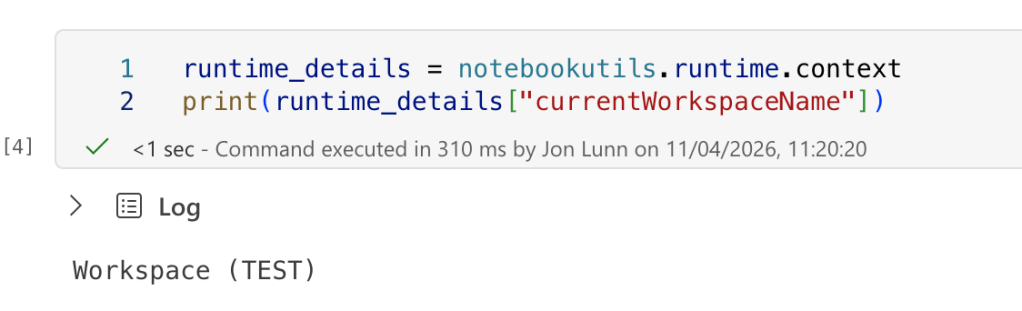
Just add it to a variable and get the items you need in your notebook process.
Table Of Contents

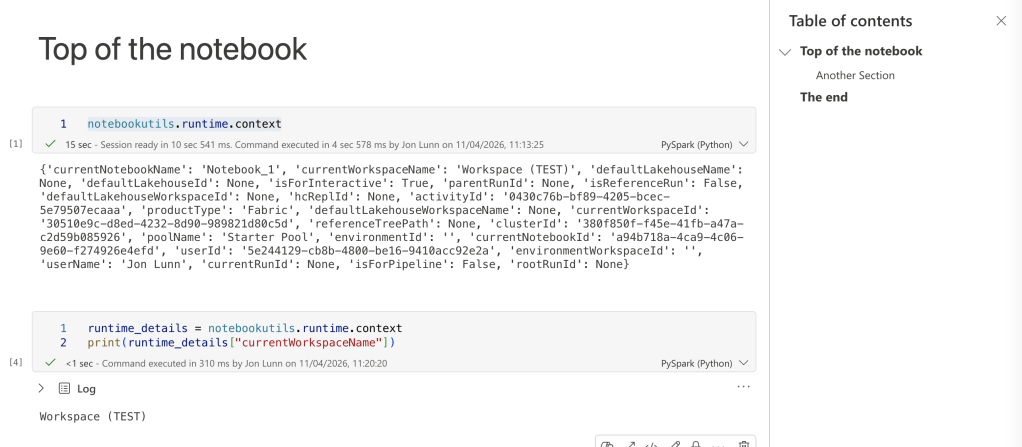
Hidden away in the ‘View’ section are two things that I use a lot. The first is table of contents. Which allows you to create a Table Of Contents, no suprise there really, but it allows a navigable point that you can use to move to sections in your notebook.
I have some big notebooks, and scrolling up and down is a bit tedious, and also trying to figure out what section you need to look for is also annoying when looking for that piece of code you really need to get to.
All you need to do is create a ‘Markdown’ cell, with a heading. As it is Markdown, you can use the Heading, Subheading etc in the display, for subdividing bits of the workflow.
So use ‘#’ for your heading, and ‘##’ for your subheadings, and its allows you to move between sections. Why this is all the way off in ‘View’ I don’t know, it’s a great helper.
Variables
Coding is 10% inspiration, 10% creation and 80% debugging. So the ‘Variables’ option in the ‘View’ tab, allows you to see the variables declared in the notebook, and the values assigned to them.
So you don’t have to populate the notebook with ‘Print’ statements? Well you can if you like, but if you are scrolling up and down the notebook, at least you can reference items a bit quicker.

Summing Up
Hope these three tips helped you. Markdown is used in notebooks, and DevOps Wiki’s and a other places as well, so it’s good to keep a link to the Markdown cheat sheet

